
The Camera events tab lists the following events related to cameras:
-
SMTP motion detection events.
-
The events received from ONVIF-compatible cameras:
-
Motion detect
-
Tamper detection. Image too blurry
-
Tamper detection. Image too dark
-
Tamper detection. Image too bright
-
Tamper detection. Global scene change
-
Event from external system
-
Event to external system
-
Configuration changed
-
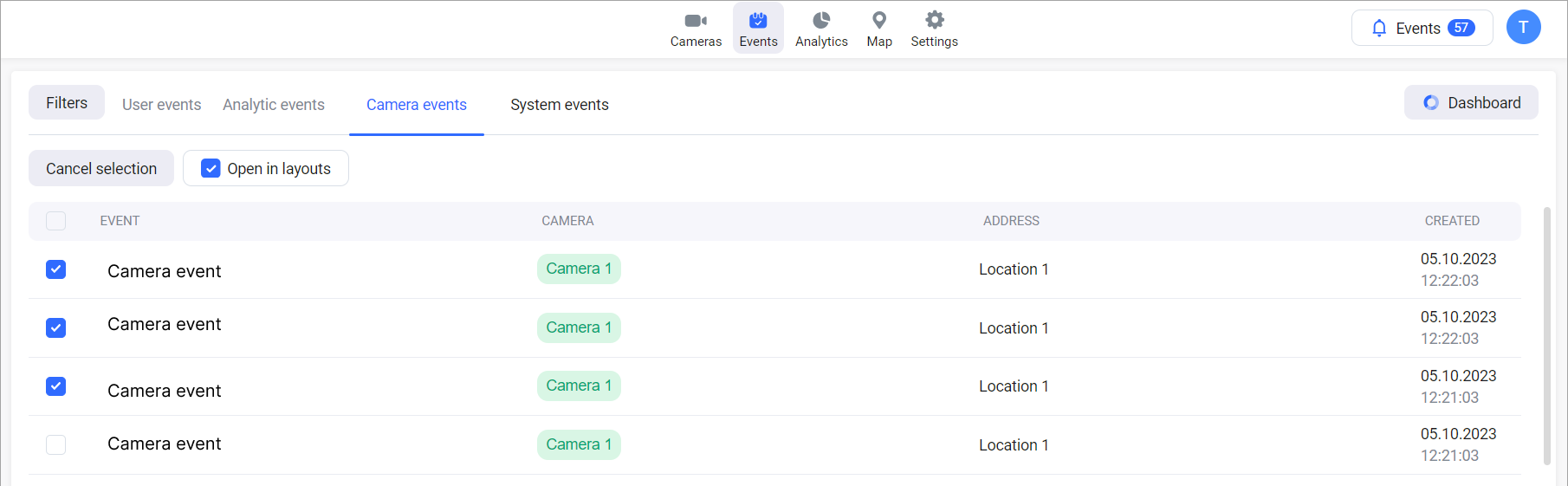
Each event row contains the following information:
-
An event name.
-
A camera name.
-
A camera location.
-
A date and time this event was created.
View an event in the player
To access archived footage of a specific event, open the Camera events list. Select the name of the camera associated with the event. This will initiate playback of the archive, directly at the time the event occurred.
Open in a layout
There is an option to simultaneously view multiple events in a layout. To do this, select the checkboxes in the list of events and Open in layout.
-
You can choose up to six events to open in a layout.
-
The Open in layout button and the checkboxes are accessible in browsers at least 1024 pixels wide.
This will initiate playback of the archive, directly at the time the events occurred.
.png?cb=72cccd747548d3addc95eb7aeea3d628)