
The Analytics tab displays a list of analytics types in which the current camera is involved.
Creation and configuration of Analytics cases is performed by a user from their web interface.
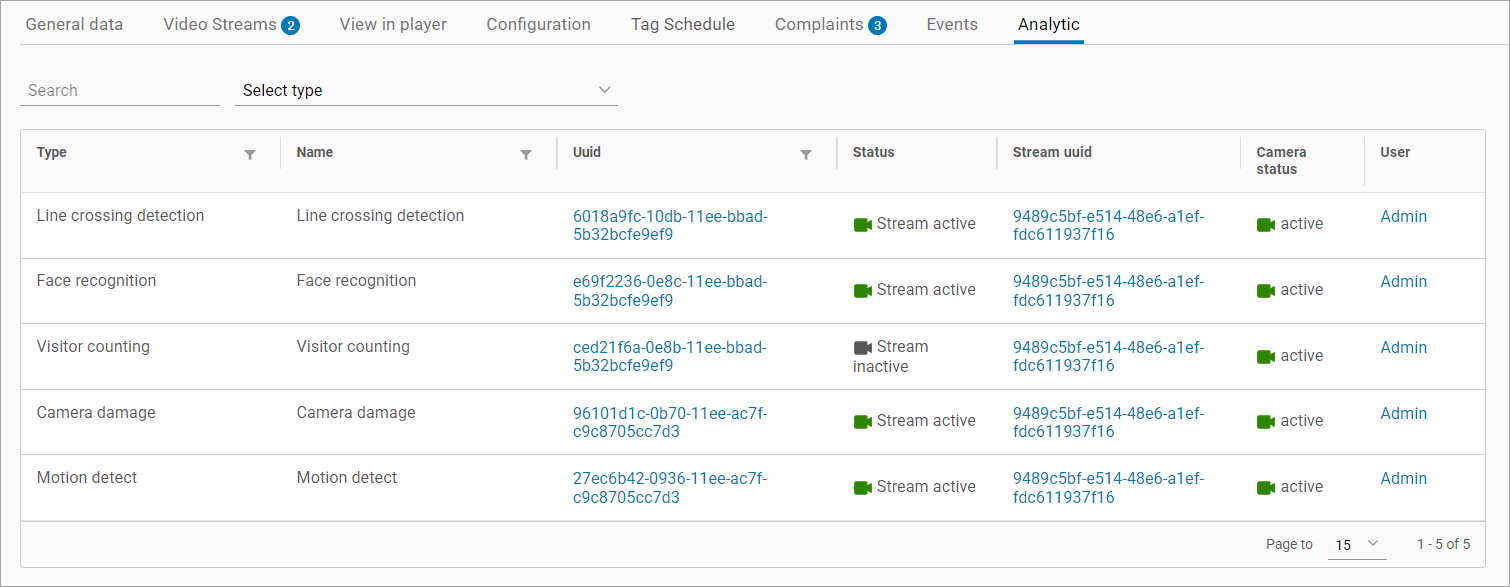
Information in the table is grouped in the following columns:
-
Type. Specifies an analytics type.
-
Name. Specifies a name of an analytics case.
-
UUID. A stream UUID of an analytics executable file. Selecting it will navigate you to the Analytics section.
-
Status. Specifies the status of the analytics executable stream. For a stream with the Stopped status, a restart button is displayed.
-
Stream UUID. Selecting it will navigate you to the Video Streams tab of the current camera.
-
Cameras status.
-
User. A username of a user who created the analytics case. Selecting the name navigates you to the user card in the Administration > Users section.
-
For a user, selecting their name will navigate you to the card of a user in the Administration > Special users tab.
-
For a sub-user, selecting their name will navigate you to the Sub users tab, where details of a user who added this sub-user are displayed.
-
On the page, you can perform the following search:
-
By analytics name
-
By analytics type
-
By task UID